Skeleton Laser Engrave File – Creative Possibilities for Crafters and Makers
If you're someone who enjoys hands-on creation—whether it's for personal projects, small business products, or custom gifts—you've probably looked for ways to add unique, detailed designs to your work. The Skeleton Laser Engrave File offers an accessible, high-quality solution for laser engraving enthusiasts. This premium PNG file is designed specifically for laser engraving machines, giving you the ability to create intricate, professional-grade engravings on a variety of materials.
What Exactly Is the Skeleton Laser Engrave File?
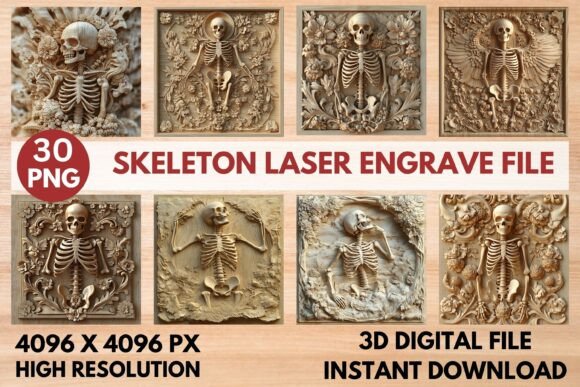
The Skeleton Laser Engrave File is a downloadable digital design package containing 15 coloring and 15 grayscale PNG files, all at 4096x4096 resolution. These grayscale images are optimized for laser engraving, allowing for detailed shading and contrast that translate beautifully onto surfaces like wood, acrylic, leather, and more. The transparent background makes it easy to resize and place the design exactly where you need it, without any unwanted edges or borders.
Perfect for Laser Engraving Enthusiasts
Whether you're using a Glowforge, LightBurn, xTool, or any other CO₂ laser machine, this file is compatible and ready to use right out of the box. The grayscale format ensures that your engraving comes out crisp and detailed, especially when using recommended settings like Speed 1000, Power 90, and Jarvis dithering in LightBurn. It’s not just a design—it's a ready-to-go engraving solution that saves you time and effort in preparing files for your laser machine.
Where and Why People Use Skeleton Laser Engrave Files
One of the most appealing aspects of the Skeleton Laser Engrave File is its versatility. Here are a few real-world situations where this file shines:
- Home décor: Add a spooky-chic vibe to wooden signs, wall art, or decorative panels for Halloween-themed interiors or year-round gothic aesthetics.
- Wood crafts: Laser engrave intricate skeleton motifs onto cutting boards, coasters, or engraved boxes for a personalized touch.
- Stationery and paper crafts: Use the design on custom greeting cards, invitations, or handmade journals for a unique visual element.
- Fashion and textiles: Apply the engraving to leather patches, fabric transfers, or wood-printed tags for apparel or accessories.
- Packaging and branding: Small businesses can use the design on product boxes, gift tags, or limited-edition packaging for a signature look.
Use Cases for Different Types of Makers
Let’s look at how different users might incorporate the Skeleton Laser Engrave File into their work:
- Hobbyists: A weekend crafter might use the file to create Halloween-themed wooden signs or engraved glassware for family gatherings.
- Small business owners: An Etsy seller could engrave the design onto wooden ornaments or jewelry to sell during the fall season.
- Educators: A teacher or workshop instructor might use the file in a laser cutting class to demonstrate grayscale engraving techniques.
- Marketers: A brand manager could integrate the design into seasonal packaging or promotional materials for a themed product launch.
- Freelance designers: A graphic artist might incorporate the engraving into a larger design project for a client needing a unique visual motif.
Practical Tips Before You Buy or Use the File
While the Skeleton Laser Engrave File is user-friendly, there are a few things to keep in mind before downloading and using it:
- It’s a PNG-only file: This is not an SVG or layered cut file. It’s meant for engraving, not cutting, so make sure it fits your project needs.
- Works best on lighter materials: For optimal contrast and visibility, use the file on lighter-colored surfaces like maple wood, white leather, or light acrylic.
- Resizing doesn’t affect quality: Since it’s a high-resolution PNG, you can scale the image up or down without losing detail.
- Test before engraving: Always do a small test engrave on scrap material to adjust power and speed settings for your specific machine.
Real-World Results You Can Expect
When you use the Skeleton Laser Engrave File with the right settings and materials, you’ll get a clean, detailed engraving that looks professionally done. For example, a laser hobbyist using a Glowforge machine on birch wood reported that the design engraved beautifully with minimal tweaking. Another user found that applying the design to acrylic created a striking contrast that looked great in a Halloween display.
Why It’s Worth Adding to Your Design Toolkit
This isn’t just another design file—it’s a practical, high-quality resource that simplifies the engraving process while delivering impressive results. Whether you're crafting for fun, creating custom gifts, or producing items for sale, the Skeleton Laser Engrave File helps you elevate your work without spending hours preparing images or adjusting settings. Its compatibility with most laser engraving software and machines makes it a versatile addition to your creative arsenal.
Final Thoughts for Makers and Creators
If you're looking to add a touch of spooky elegance or intricate detail to your laser engraving projects, the Skeleton Laser Engrave File is a solid investment. It’s designed with real-world use in mind, from the high-resolution grayscale format to the ease of resizing and compatibility across platforms. Whether you're a seasoned laser engraver or just starting out, this file gives you the tools to create professional, eye-catching designs with minimal effort.